Introduction
This article describes how the Uplevel system addresses the technical requirements of the HIPAA Security Rule (45 CFR 164.310–312). Because the Security Rule is written at a high level, the implementation guidance referenced here comes from NIST Special Publication 800-66, which translates the Rule into concrete control objectives.
Applicable requirements categories
Most HIPAA requirements concern training, organizational policy, personnel management, process documentation, and physical security — none of which the Uplevel hardware or service can satisfy on its own. The categories that do map onto Uplevel features are the ones that govern storage, transmission, and access to Electronic Protected Health Information (EPHI):
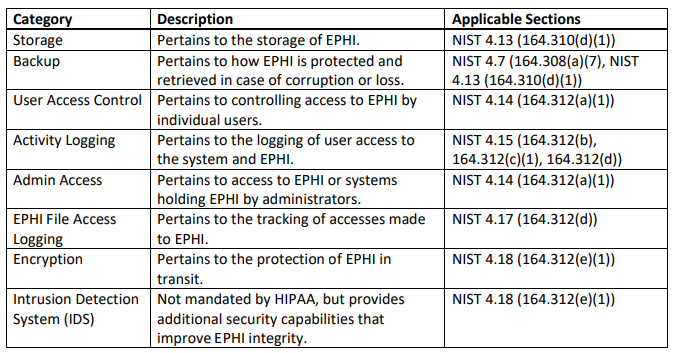
The remaining sections walk through each category and the corresponding Uplevel capability. NIST 800-66 lists requirements that hardware cannot implement on its own (for example, the workload-and-access-needs analysis in §4.14 / 45 CFR 164.312(a)(1) is inherently a customer-staff activity); those are out of scope here.
Storage
- EPHI on Uplevel NAS shares is encrypted at rest. Deleting a share destroys the data on it irretrievably.
- The gateway can run an Active Directory service that keeps a continuous audit log of every read, write, create, delete, and modify operation on the NAS, tied to the authenticated user.
- Decommissioning a gateway by deleting its shares satisfies the HIPAA disposal requirement — there is nothing to recover.
- Because the storage media themselves are encrypted, physically removing them does not expose EPHI.
- Gateways are bound to a specific customer and cannot be reassigned without explicit coordination with Uplevel, preventing EPHI access via theft of the device.
Backup
- Cloud backup, when enabled, periodically replicates every NAS share over an encrypted tunnel to an encrypted off-site mirror. Lost EPHI can be restored from these backups.
- Off-site cloud backups in AWS satisfy both the off-site backup requirement and the requirement to keep a retrievable exact copy before equipment is moved.
- For catastrophic failure or malicious tampering, EPHI is recoverable from cloud backup; local read-only snapshots on the NAS provide an additional layer of protection against tampering.
- Each customer’s cloud backup lives on dedicated, isolated storage, so EPHI cannot leak between tenants.
- Cloud backups can only be retrieved through the customer’s own gateway on-site, which further limits unauthorized release.
User access control
- The on-board Domain Controller, when active, gates NAS access (and therefore EPHI) behind unique user credentials.
- Logins, logouts, and EPHI accesses are recorded against those credentials in the audit log.
- Shares can be restricted to specific user groups (e.g. Employees, Accounting) to enforce least-privilege access.
- Automatic session lock, minimum password complexity, lockout after failed attempts, and mandatory password expiry are all enforced by the Domain Controller — covering the auto-logoff and password management requirements.
- Passwords are stored as one-way hashes, never as plaintext.
- Disabling or deleting a user immediately revokes their EPHI access.
Activity logging
In Domain Controller mode the Uplevel NAS keeps a detailed audit trail. Because users must authenticate before they can reach EPHI on the shares, every access in the log is attributable to a specific identity.
- The system also logs equipment events (connects, disconnects, configuration changes) and device-level events (workstation join and leave).
- Each audit record carries the user ID, the action performed (read, write, create, delete, etc.), and a timestamp.
- Failed access attempts — bad passwords, unauthorized read attempts on EPHI — are written to the audit log alongside successful ones.
Administrative access
- Admin login and logout events are recorded on the Uplevel portal.
- Configuration adds, deletes, and changes are recorded on the portal alongside the admin who made them.
- Administrative access can be protected with multi-factor authentication.
- Administrators can provision and restore backup copies of EPHI during emergencies without needing direct access to the EPHI itself.
File-level EPHI logging
- The NAS in Domain Controller mode records per-file accesses and modifications to EPHI.
- Each EPHI audit record includes the user ID, the specific action (read, write, create, delete), and a timestamp.
- Failed access attempts against EPHI files (for example, failed reads) are logged.
Encryption and access control
- EPHI at rest on the Uplevel NAS is encrypted with strong AES.
- EPHI in transit — to the cloud backup target, or to a remote user over VPN — is encrypted with strong AES.
- Both the cloud backup and the VPN are protected against in-flight tampering by a Message Integrity Check.
- EPHI carried over Uplevel Wi-Fi is protected by mandatory strong AES encryption with MIC. Open (passwordless) Wi-Fi access to EPHI is not permitted.
- Unauthorized network access via unused Ethernet jacks can be prevented by disabling those ports from the portal. The portal can also raise an alert if a known device is unplugged and a different one is connected in its place.
IDS / IPS
- With IDS/IPS enabled, the gateway inspects WAN-side traffic against a rule set to detect and block malicious attempts to reach EPHI on the NAS.
- Detected attacks are written to the audit log and can be forwarded by email to an external logging system for retention and analysis.
- IDS/IPS coverage applies to every network segment that has access to EPHI shares.