Summary
The Uplevel gateway’s firewall enforces rules that govern traffic flow between security groups — that is, between VLANs / LAN subnets. The defaults are designed to give each group a sensible isolation posture out of the box:
- Guest devices are fully isolated. They can reach the Internet and nothing else on the LAN.
- Boss devices can reach every other group.
- Devices in user-created groups can reach Employees.
- Devices in Employees are reachable from Boss and from user-created groups.
Default configuration
The default behaviour described above can be overridden per-group. On a security group’s configuration page, tick Override Default Inter-Group Firewall Rules to expose the override table:
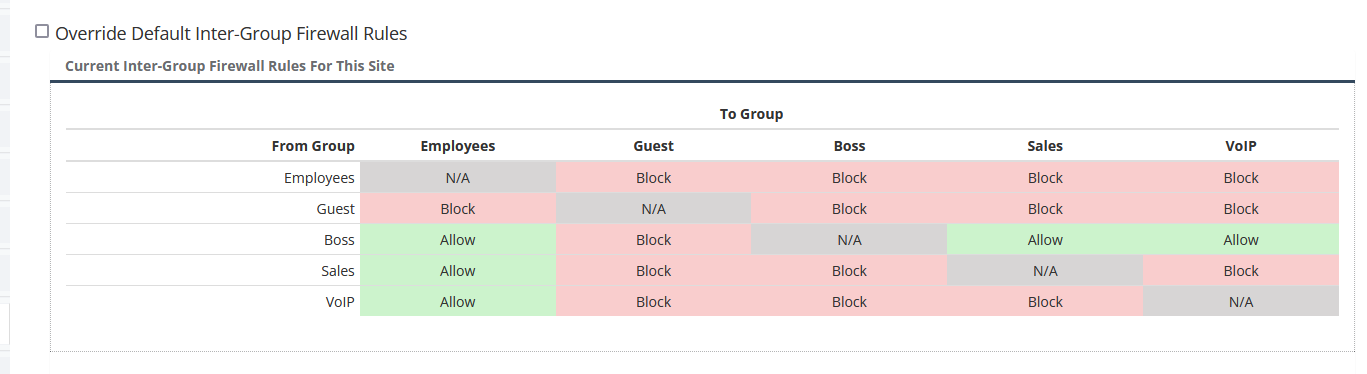
Click any cell in the table to change the firewall rule that governs traffic in that direction (from the row group to the column group).
Reading the table
The cells use a three-colour legend:
- Grey “N/A” — the cell represents the group you’re currently configuring against itself, so there is no inter-group rule to set.
- Green — traffic is allowed to flow back and forth between these two groups.
- Red — traffic from this security group is blocked in both directions.
Changes are applied immediately on save; no reboot is required.