Enabling backup in the Portal
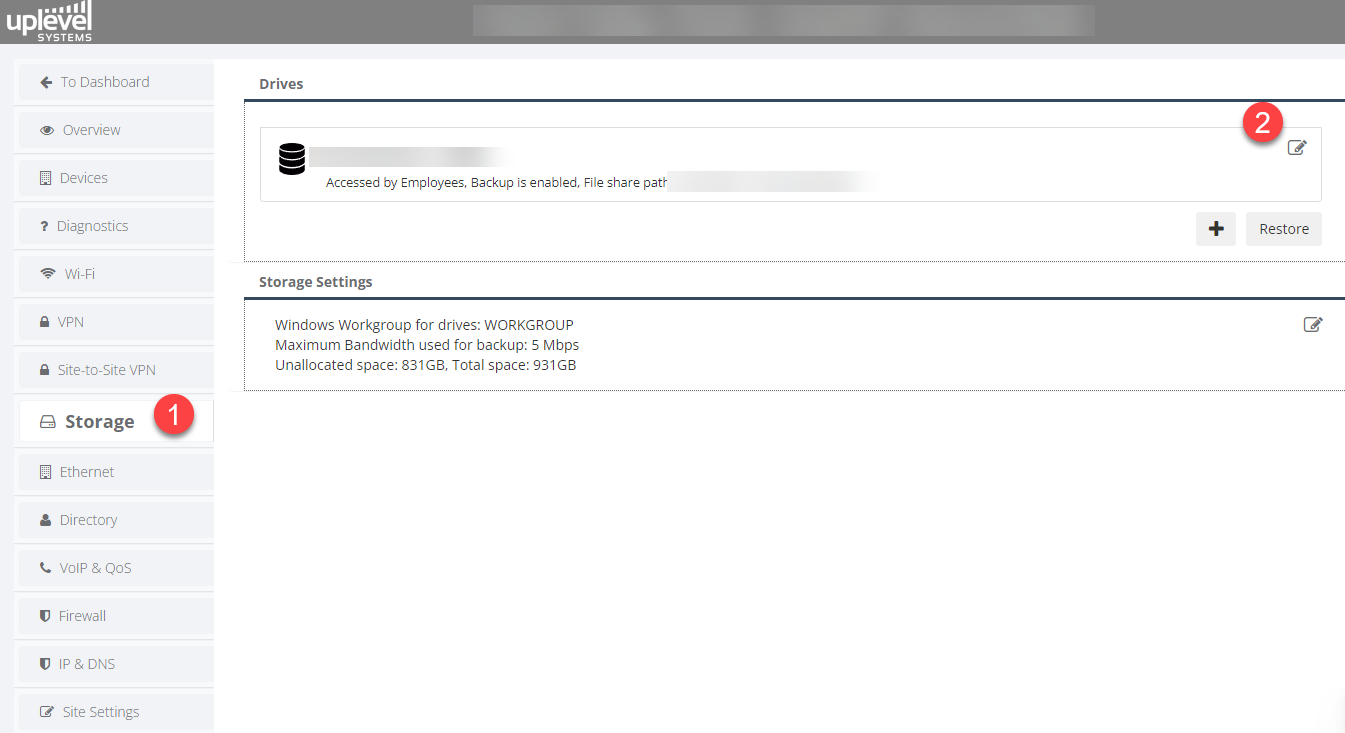
- Sign in to the Portal and open Storage.
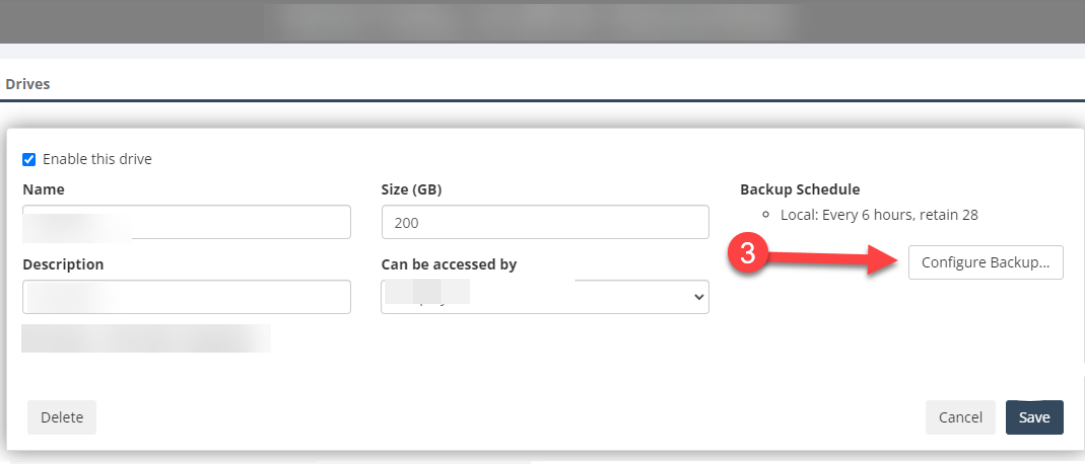
- Click the edit (notepad) icon on each share you want to protect.
- Choose Configure Backup.
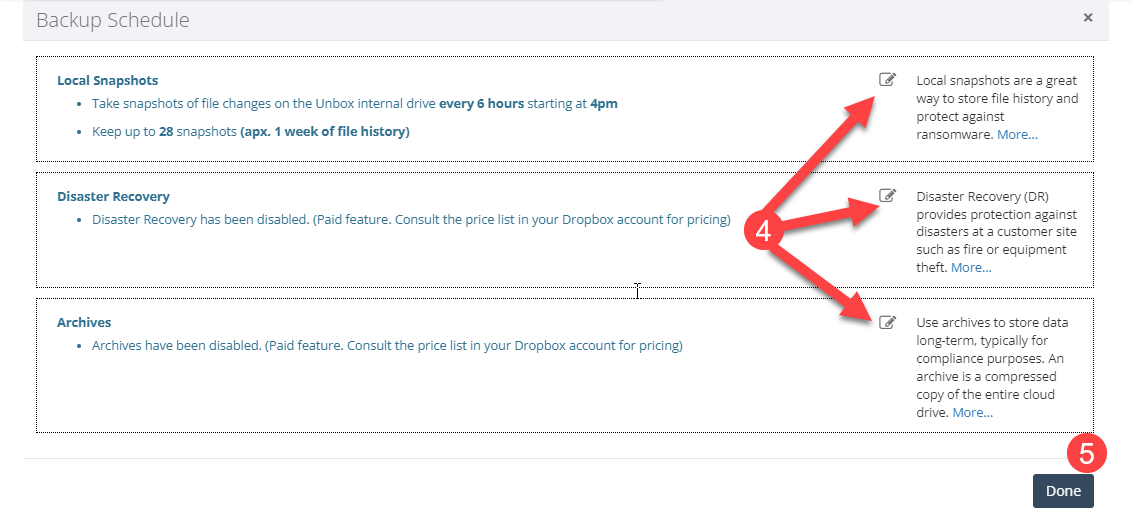
- Pick the tier you want: Local Snapshots, Disaster Recovery, or Archive.
- Save through to the Backup Preferences window and click Done to exit.
The three tiers
The backup system layers three tiers on top of each other. They solve different problems and have different cost profiles.
Local snapshots — instant protection, no performance impact
No additional fees.
Local snapshots use the BTRFS copy-on-write (CoW) capability built into the gateway. A snapshot is an immutable record of the share’s state at a moment in time, but it doesn’t duplicate the data — it records a metadata view that points at the existing blocks. The snapshot only starts to consume real space when the live file system changes: at that point the original blocks stay attached to the snapshot while new blocks back the live file.
Two everyday uses fall out of this design:
- File recovery. Users restore accidentally deleted or modified files directly via the Windows Previous Versions interface — see Restoring Files and Directories from Snapshots.
- Ransomware defense. Because snapshots are read-only, an active ransomware process can’t encrypt them. After the live file system has been cleaned up, the share rolls forward from an untouched snapshot and users are back at the previous good state.
Disaster Recovery — cloud-side digital twin
Contact Sales for pricing.
Disaster Recovery (DR) makes a complete cloud-side copy of the NAS share. The first DR sync is a full upload, so it takes time proportional to the share size. After that, only the daily diffs flow up, keeping ongoing bandwidth impact small.
The point of DR is the worst-case scenario: the gateway is stolen, destroyed in a fire, or otherwise gone. When that happens we restore the cloud image onto a replacement gateway and ship it overnight — typical delivery is by 8 a.m. the next business morning. The replacement plugs in and the site is back online with the previous data in place.
For the security details of how DR images are stored, see Disaster Recovery — How We Secure and Protect Your Data.
In a disaster, contact us immediately. Email support@uplevelsystems.com or call 917-317-3001.
Next-morning delivery and complete-restore timing depend on when we’re notified, shipping carrier cut-offs, and the total size of the data to restore.
Why every site needs some DR strategy
The point isn’t that everyone needs Uplevel’s DR specifically. The point is that every site needs a tested DR strategy of some kind — Uplevel’s, another provider’s, or a documented in-house process. Catastrophic data loss is a business-survival event, not an IT inconvenience.
Test the DR process quarterly. Treat it like a fire drill: inconvenient until it matters, then invaluable. Each quarterly test should:
- Verify the recovery procedure is current.
- Confirm all critical data is being captured.
- Walk through an actual recovery (not just a paper review).
- Document and fix anything that broke.
- Refresh recovery-time expectations against current data volumes.
The maintenance cost of an actively tested DR plan is small compared to the cost of finding out, mid-incident, that the backup process quietly stopped working months ago.
Archives — long-term preservation
Contact Sales for pricing.
Archives are compressed long-term copies of DR images held for cold retention. They are not designed for day-to-day recovery — they need a decompression step before the data is accessible again — but they are the right home for records that have to be preserved for compliance long after they stop being useful for daily operations.
Retention requirements vary widely by industry. An accounting firm typically needs roughly seven years of records on hand for tax and audit purposes. A healthcare provider may need to preserve medical imaging and patient records for the patient’s lifetime.